
CART 0

Rack Cards

$26.00

4 x 9 rack cards on heavyweight gloss, matte or linen cover

Select file

    Overview

    About Rack Cards

    Rack cards built for the brochure stand — 4″ × 9″ on heavyweight cover stock in gloss, matte, linen, and more, printed in full color on one or both sides. The tall format fits standard display racks at hotels, visitor centers, clinics, restaurants, and real estate offices.

    Add rounded corners, pick your paper, and order from 25 up. For a premium finish choose UV gloss cover (2 days) or Raised Spot UV (7 days), which lifts a glossy layer off selected areas of your design.

    Design online with our free rack card templates or upload a print-ready file. Order by 2 PM and pick them up today in Lawrenceville or Suwanee, GA — or have them shipped.

    Materials & finishes

    Finishes & materials

    14pt Cardstock
    Thick, sturdy card stock
    130lb Gloss Cover
    Bright coated stock with vivid color
    110lb Matte Cover
    Smooth, non-reflective, easy to write on

    Specs

    File setup & bleed

    File SetupFor a 9″x4″ rack card, your design file should be 9.25″x4.25″.This allows for a 0.125″ bleed area on all sides to ensure the background coloror image will show to the edges of the rack card when it is cut.YOUR DESIGNKEEP TEXT INSIDE THE GREEN SAFE ZONE4.25″ with Bleed4″ Finished9″ Finished9.25″ with BleedSAFE ZONEDO NOT place important textsor images beyond the dotted areaTRIM LINEThis is the actual cut of thefinal design.BLEEDExtend your artwork past thisline if you want your design toreach the edges of the rack card.

    Mailing a rack card? Keep the lower right of the back clear for the address and postage, and follow USPS size rules (minimum 3.5″ × 5″, maximum 4.25″ × 6″ for rack card rate).

    Why rack cards

    Why choose our rack cards

    Made for the rack

    Standard 4″ × 9″ size fits brochure holders, counter stands, and lobby displays.

    Heavyweight stocks

    Gloss, matte, linen, and UV coated cover papers that feel substantial in hand.

    Same-day on most stocks

    Order by 2 PM for same-day pickup on text and cover papers; UV and Raised Spot UV take a little longer.

    One or both sides

    Print the back with a map, hours, menu, or QR code at a small added cost.

    How it works

    How to order

    1. Pick paper & quantity — choose your stock, sides, corners, and amount (size is a fixed 4″ × 9″).
    2. Add your artwork — upload a print-ready file, or design one online.
    3. We print & cut — same day on standard stocks; 2 days UV, 7 days Raised Spot UV.
    4. Pick up or ship — grab them locally in GA, or have them shipped.

    FAQ
    Rack Cards FAQ

    What size is a rack card?
    4″ × 9″ — the standard size for brochure racks and counter displays. Set up your file at 4.25″ × 9.25″ to include bleed.
    Which paper should I pick?
    100lb or 130lb gloss cover is the everyday choice. Use matte cover for an easy-to-read, no-glare finish and linen for a textured upscale look. UV gloss cover (16pt) is the stiffest option.
    Can I print both sides?
    Yes. Choose “Front and Back” and upload a second file or design the back in our online tool.
    How fast can I get them?
    Standard papers are ready the same day when ordered by 2 PM (weekdays). UV gloss cover takes 2 business days and Raised Spot UV about 7.
    Do you offer rounded corners?
    Yes — select Rounded Corners at checkout for a 1/4″ radius on all four corners.
    What is the minimum order?
    25 cards. Volume pricing kicks in at 50, 100, 250, 500 and up.
    ★★★★★

    5.0

    Rated 5.0 out of 5 by 131 customers on Google

    Read our Google reviews
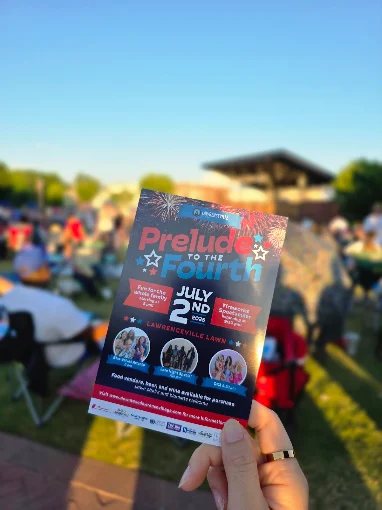
    Postcard for Prelude to the Fourth event, printed by Overflow PrintCustom postcard printed by Overflow Print
    Business Card Templates

    Choose a template

    Start from a ready-made design, or upload your own. All templates are fully editable.

    Business Cards
    Templates
    Add Text
    Select a text layer, then bend it along a curve.
    Uploads

    Click or drop your logo / image

    Graphics

    Click to add. Edit fill, border & opacity from the top toolbar.

    Background color
    Swatches
    CMYK
    Product options
    More

    Photos, QR codes, etc. (v2)

    Align to page
    Layer order

    Select a layer on the card, then align or reorder it. Shortcuts: ] / [ to front/back, ⌘] / ⌘[ forward/backward.

    Text alignment
    List style

    Toggle on/off by tapping again. Works per line of the selected text.

    Spacing
    3.5 in
    2 in
    3.5″ × 2″
    Front
    Back
    ⚙

    Finished with your design?

    Log in to save your project and access it in the future.

    Drag-free preview
    Design preview

    Review your design

    Double-check the following details before you continue.

    • Text is clear and easy to read
    • Information is spelled correctly
    • Images are sharp with no blurring
    Design preview

    Choose your options

    Select quantity, paper, and finishing. Your design is saved.

    Scroll to Top